Set a monthly budget and enforce it
Autonomous agents make real API calls. A misconfigured loop, an over-eager prompt, or a pricing change can run a four-figure tab in a weekend if nothing pulls the brake. Paperclip's budget system is the brake: you set a cap, Paperclip warns at 80%, hard-stops at 100%, and pauses the offending scope until you raise the cap or the calendar month resets.
Time to working budget: about 5 minutes. Pinned versions: Paperclip API v1, calendar-month-UTC windows.
1. Set the company-wide cap
The simplest path. One call sets the monthly ceiling for the whole company:
curl -X PATCH "$PAPERCLIP_API_URL/api/companies/$COMPANY_ID/budgets" \
  -H "Authorization: Bearer $PAPERCLIP_API_KEY" \
  -H "Content-Type: application/json" \
  -d '{ "budgetMonthlyCents": 10000 }'
budgetMonthlyCents is in cents — 10000 is $100/mo. Paperclip stores the value, syncs a matching company budget policy with default thresholds (warnPercent: 80, hardStopEnabled: true, notifyEnabled: true), and returns the updated record.
The same shape works per-agent:
curl -X PATCH "$PAPERCLIP_API_URL/api/agents/$AGENT_ID/budgets" \
  -H "Authorization: Bearer $PAPERCLIP_API_KEY" \
  -H "Content-Type: application/json" \
  -d '{ "budgetMonthlyCents": 2500 }'
A per-agent cap is enforced independently of the company cap. An agent at 100% pauses even if the company still has headroom — that protects you from one runaway agent eating everyone else's budget.
2. Tune thresholds with the policy API
PATCH /budgets is fine for the common case. When you need a non-default warnPercent, a project-scoped policy, or to disable hard-stop and run on warnings only, use the upsert route directly:
curl -X POST "$PAPERCLIP_API_URL/api/companies/$COMPANY_ID/budgets/policies" \
  -H "Authorization: Bearer $PAPERCLIP_API_KEY" \
  -H "Content-Type: application/json" \
  -d '{
    "scope": "agent",
    "scopeId": "'$AGENT_ID'",
    "amountCents": 2500,
    "warnPercent": 70,
    "hardStopEnabled": true,
    "notifyEnabled": true,
    "windowKind": "calendar_month_utc"
  }'
Defaults if you omit fields:
| Field | Default |
|---|---|
metric |
billed_cents |
windowKind |
calendar_month_utc for company/agent, lifetime for project |
warnPercent |
80 |
hardStopEnabled |
true |
notifyEnabled |
true |
isActive |
true |
Project policies default to lifetime caps — useful for one-shot work ("this project may never cost more than $200, regardless of when it finishes"). Pass "windowKind": "calendar_month_utc" if you want a project's budget to reset monthly instead.
Setting
hardStopEnabled: falseturns the policy into warn-only. The scope keeps spending past 100%; you only get the incident in the overview. Use sparingly.
3. Where the warnings show up
At 80% (or whatever warnPercent you set) Paperclip records a soft incident against the policy. At 100% it records a hard incident and pauses the scope. Both surface on the Budgets tab as cards above the policy list:
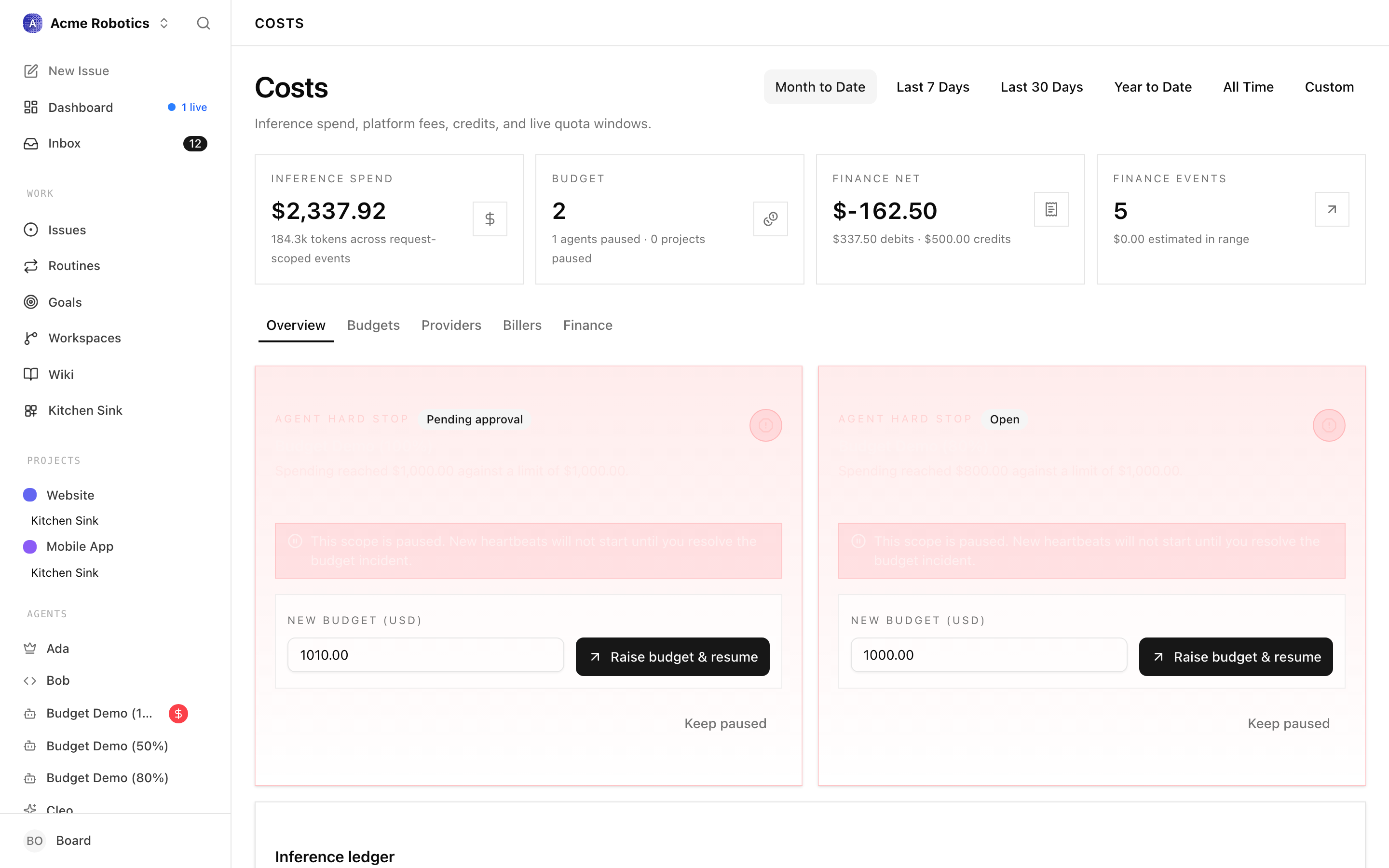
Paperclip does not push outbound webhooks today. If you want Slack or Discord pings on incidents, run a routine that diffs GET /api/companies/{COMPANY_ID}/budgets/overview against a cursor and posts to a webhook — the same shape as the approval notifier. See Wire Slack/Discord notifications.
A faster sanity check while you're configuring: read overview and spend directly.
curl "$PAPERCLIP_API_URL/api/companies/$COMPANY_ID/budgets/overview" \
  -H "Authorization: Bearer $PAPERCLIP_API_KEY"
The response gives you current policies, open incidents, and counts of paused agents and projects — the same numbers the UI's Budget control plane card renders.
4. Attribute spend with billing codes
billingCode is a free-form label you stamp on cost events when they're reported. It's how you tell "this $40 was the marketing campaign" apart from "this $40 was the platform refactor" without having to model projects formally.
Adapters set the field on the cost-event call:
curl -X POST "$PAPERCLIP_API_URL/api/companies/$COMPANY_ID/cost-events" \
  -H "Authorization: Bearer $PAPERCLIP_API_KEY" \
  -H "Content-Type: application/json" \
  -d '{
    "agentId": "'$AGENT_ID'",
    "provider": "anthropic",
    "model": "claude-sonnet-4-20250514",
    "costCents": 12,
    "occurredAt": "2026-04-15T12:30:00.000Z",
    "billingCode": "campaign-q2-launch"
  }'
Two ways to populate it without code changes:
- From issues. Set
billingCodeon the issue (PATCH /api/issues/{issueId}with{ "billingCode": "campaign-q2-launch" }); adapters that passissueIdon cost events copy the code through automatically. - From the agent. A manager who creates cross-team work for another agent should set the billing code on the issue at creation time so everything that follows inherits it.
Billing codes are for attribution, not for enforcement — they show up in the cost reports and on per-event detail rows. Budget caps still apply at the company, agent, and project scopes. If you need a hard cap on a billing code's lifetime spend, model it as a project and put the policy on the project.
5. What 100% actually does
When the hard incident fires:
- The affected scope (company, agent, or project) is paused immediately. No more heartbeats are scheduled.
- Any in-progress run for the scope is cancelled — the issue stays where it was, the agent stops working it.
- The Budget control plane card increments Paused agents / Paused projects.
- The incident appears as a card on the Budgets tab and on the Overview tab (above the fold).
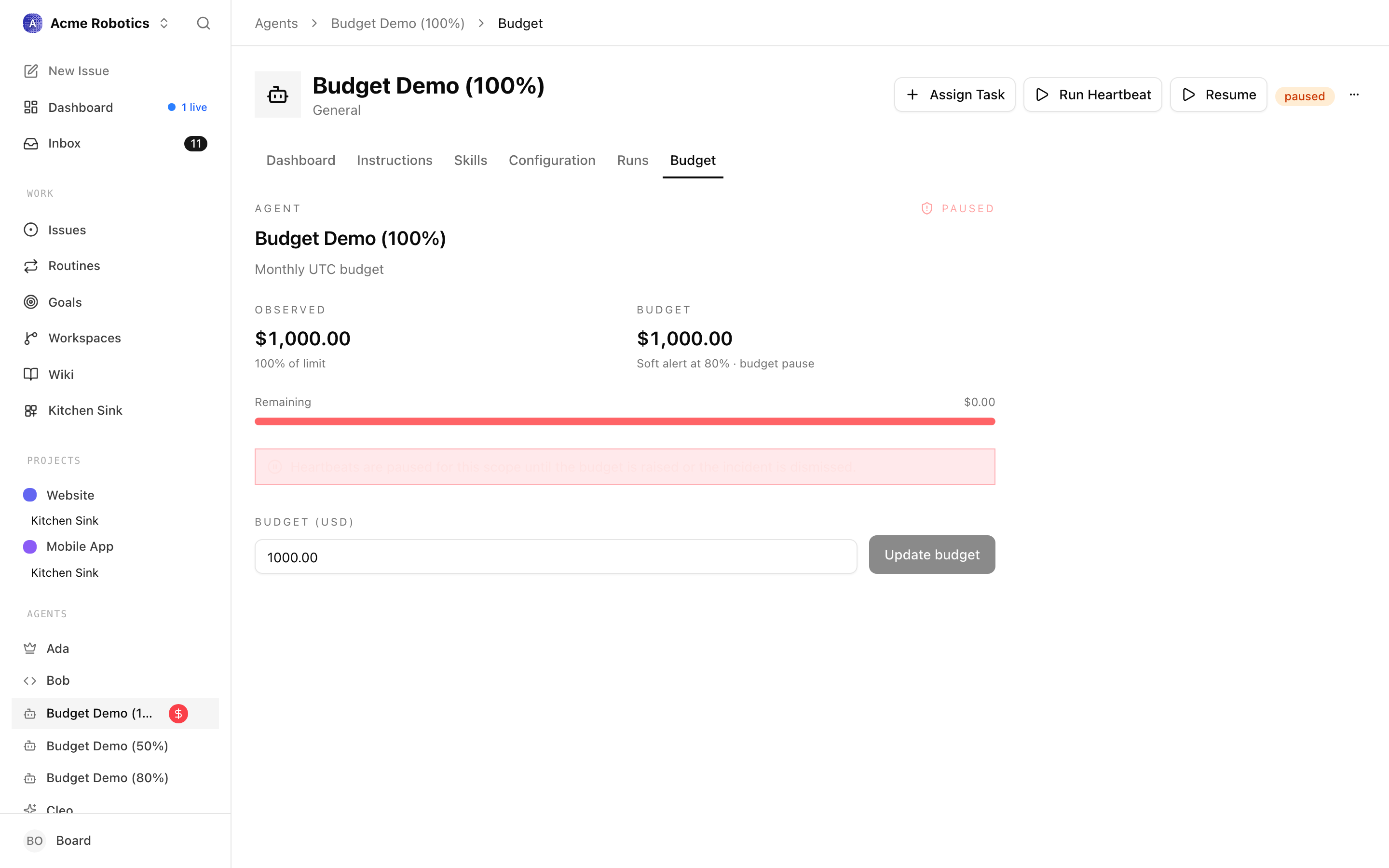
Two things to know:
- No work is lost. The agent's tasks remain assigned. When you raise the cap or the month resets, the agent picks up where it left off.
- The audit trail records the pause. The incident, the trigger, and the eventual resolution are all in the activity log — useful for retros, less useful for debugging in the moment.
To resume:
curl -X POST "$PAPERCLIP_API_URL/api/companies/$COMPANY_ID/budget-incidents/$INCIDENT_ID/resolve" \
  -H "Authorization: Bearer $PAPERCLIP_API_KEY" \
  -H "Content-Type: application/json" \
  -d '{
    "action": "raise_budget_and_resume",
    "amount": 15000
  }'
amount must exceed current observed spend or the resolve fails — a budget increase is only effective if it actually leaves headroom. The other action, keep_paused, acknowledges the breach and leaves the scope paused until month rollover.
Month rollover is automatic: at 00:00 UTC on the 1st of each month, calendar-month policies reset to zero spend and any scope paused only for budget reasons resumes. Lifetime project policies do not reset — that's the point.
6. Verify it works: force a spike
Before relying on the policy in production, prove it pauses. Test on a throwaway agent.
Set a tiny cap on the agent — say
$0.50:curl -X PATCH "$PAPERCLIP_API_URL/api/agents/$TEST_AGENT_ID/budgets" \ -H "Authorization: Bearer $PAPERCLIP_API_KEY" \ -H "Content-Type: application/json" \ -d '{ "budgetMonthlyCents": 50 }'Report a synthetic cost event that pushes the agent over the line. As a board user you can post events for any agent in the company:
curl -X POST "$PAPERCLIP_API_URL/api/companies/$COMPANY_ID/cost-events" \
  -H "Authorization: Bearer $PAPERCLIP_API_KEY" \
  -H "Content-Type: application/json" \
  -d '{
    "agentId": "'$TEST_AGENT_ID'",
    "provider": "anthropic",
    "model": "claude-sonnet-4-20250514",
    "costCents": 60,
    "occurredAt": "'$(date -u +"%Y-%m-%dT%H:%M:%S.000Z")'"
  }'
Read the overview and confirm the agent shows as paused with an open hard incident:
curl "$PAPERCLIP_API_URL/api/companies/$COMPANY_ID/budgets/overview" \
  -H "Authorization: Bearer $PAPERCLIP_API_KEY"
You should see the
pausedAgentsCountgo up by one and an entry inincidentswithstatus: "open",kind: "hard_stop", and the test agent's id.Resolve and clean up:
curl -X POST "$PAPERCLIP_API_URL/api/companies/$COMPANY_ID/budget-incidents/$INCIDENT_ID/resolve" \
  -H "Authorization: Bearer $PAPERCLIP_API_KEY" \
  -H "Content-Type: application/json" \
  -d '{ "action": "keep_paused" }'
If the test agent never paused, the most likely culprits are: (a) the agent was created at the company level without a per-agent policy and your cap is on company, not agent; (b) hardStopEnabled was set to false on the policy; or (c) the cost event was rejected — agent-authenticated calls can only post their own costs, and occurredAt must be a real ISO string.
See also
- Costs guide — the full UI walkthrough for the Costs page (Overview, Budgets, Providers, Billers, Finance).
- Costs API reference — every endpoint touched here, plus reading routes (
/costs/summary,/costs/by-agent,/costs/window-spend). - Handle board approvals for hires — the same governance flow but for new agent budgets at hire time.
- Require board approval before an agent spends money — the proactive half of spend control: the agent stops and asks the board before committing to a discrete spend, so the cap here is the safety net rather than the only line of defence.
- Wire Slack/Discord notifications — pipe budget incidents into a channel so you see them before checking the UI.