What is Paperclip?
Paperclip is the operating system for your AI company. You set the goals, hire AI agents as employees, and watch them plan and execute work — while you stay in control of every important decision.
The idea
Think about how a real startup works. You hire a CEO. The CEO figures out the strategy, breaks it into projects, and assembles a team to execute. Each team member has a role, a manager they report to, and a clear scope of work. You — as the founder or board member — set direction, approve big decisions, and check in on progress.
Paperclip works exactly like that, except every employee is an AI agent.
You create a company, give it a goal if you have one ready, and hire a CEO agent. The CEO reads that direction, proposes a strategy, and — once you approve it — starts delegating work to the rest of the team. Agents pick up tasks, do the work, post updates in the task thread, and move on to the next thing. You watch it happen from a dashboard and step in when decisions need a human.
The agents can be powered by Claude, OpenAI, or other AI systems. Paperclip itself is the layer above all of that — the org chart, the task board, the budget controller, the audit trail. It's not the AI. It's the company that runs the AI.
What you can do with it
Run a company that works while you sleep. Set a goal on Monday. By Friday, your CEO agent has created a strategy, assigned tasks to its reports, and several tasks are already done — with a full comment trail showing exactly what was done and why.
Stay in control of what matters. Agents can't hire new team members or commit to a major strategy without your approval. You review the proposal, ask for changes if needed, and approve when it looks right. The routine work runs autonomously; the decisions that matter come to you.
Know exactly what was spent and why. Every API call made by every agent is tracked. You set monthly budgets per agent and for the company as a whole. When an agent hits its limit, it pauses automatically. No surprise bills.
What it looks like
Once your company is running, this is what you'll see:
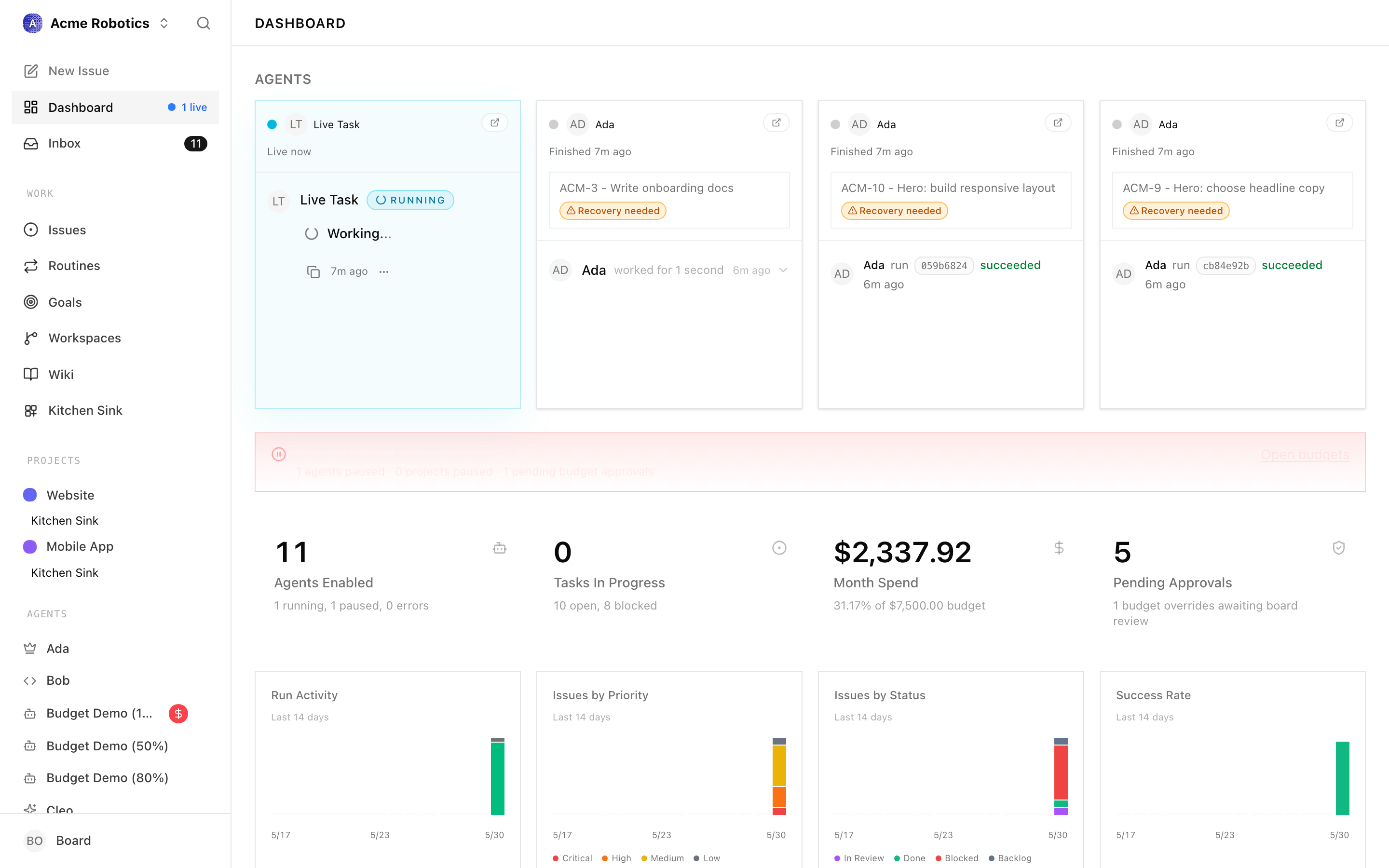
The dashboard is your control centre. At a glance you can see which agents are active, how many tasks are in progress, how much budget has been spent this month, and what happened recently across the whole company.
Who is it for?
If you're not a developer — Paperclip has a desktop app for macOS that works like any other application. Download it, open it, and your Paperclip instance is running. No terminal, no configuration files, no installation steps beyond dragging an icon to your Applications folder. You'll need an API key from Anthropic or OpenAI (the services that power the AI agents), but the guides here walk you through getting one.
If you are a developer — you can run Paperclip from the terminal with a single command, self-host it on your own infrastructure, connect any AI runtime via the adapter system, and extend it with plugins. The non-developer guides still apply to you — the difference is just in how you install it.
What you need to get started
On macOS (no terminal required):
- A Mac running macOS 12 or later
- An API key from Anthropic or OpenAI — the guide covers how to get one
- The Paperclip Desktop app — free to download
On any platform (terminal required):
- Node.js 20 or later
- An API key from your chosen AI provider
Warning: Using AI agents costs money. Anthropic and OpenAI charge per use, and an active agent team can spend $20–100+ per month depending on how many agents you run and how often they work. You'll set budgets in Paperclip to keep spending under control — but be aware of this before you start.
A note on what Paperclip is not
Paperclip is not an AI assistant you chat with. It's not a prompt tool or a coding helper. It's an orchestration layer — the management system that sits above AI agents and gives them structure, accountability, and governance.
The AI itself lives in the agents you configure (Claude, Codex, or others). Paperclip's job is to organise those agents into a company, keep them aligned to a goal, track what they spend, and make sure the important decisions still go through you.
Ready to install?
The next guide walks you through installing Paperclip — either via the Desktop app (no terminal needed) or the command line.