Agent Adapters
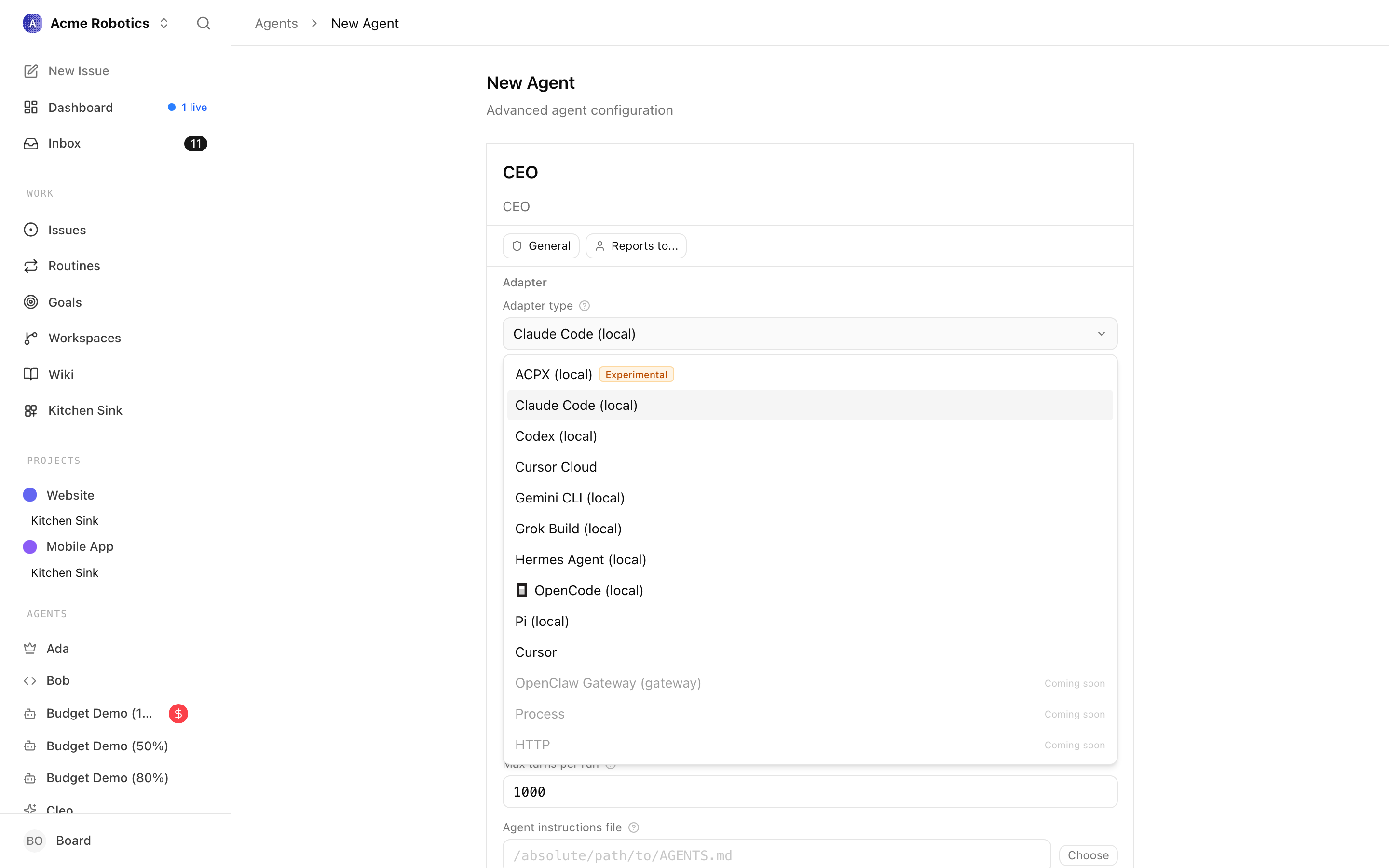
When you create an agent in Paperclip, one of the first things you configure is its adapter. The adapter is the bridge between Paperclip and the AI system that actually runs your agent — it tells Paperclip how to launch the agent, how to pass it work, and how to receive results back.
Think of it like a power adapter for different countries. The electricity (Paperclip's task system and org chart) is the same everywhere, but the plug you need depends on the socket (the AI runtime you're connecting to). Claude Code needs one configuration, OpenAI Codex needs another, and a custom cloud-based agent needs a third.
Without an adapter, an agent is just a record in a database. With one, it's a working member of your team.
Adapter comparison
| Adapter | Best for | Requires |
|---|---|---|
claude_local |
Most users — runs Claude on your Mac | Claude Code installed, Anthropic API key |
codex_local |
OpenAI users — runs Codex on your Mac | Codex CLI installed, OpenAI API key |
gemini_local |
Gemini users — runs Gemini CLI on your Mac | Gemini CLI installed, Google credentials |
opencode_local |
Multi-provider flexibility, switchable models | OpenCode CLI installed, relevant API keys |
cursor |
Users already working inside Cursor | Cursor installed and configured |
pi_local |
Pi users wanting Pi's built-in tool set | Pi CLI installed, relevant API keys |
hermes_local |
Persistent memory, 30+ tools, 80+ skills | Hermes Agent installed (Python 3.10+) |
For most people getting started, claude_local is the right choice. It runs directly on your Mac using the same Claude that powers Anthropic's Claude.ai, and it only needs Claude Code plus an API key wired through environment variables.
Claude Local (claude_local)
The claude_local adapter runs your agent using Claude Code — Anthropic's command-line AI tool — directly on your Mac. When Paperclip triggers a heartbeat, it launches Claude Code with the agent's context and task, waits for the run to complete, and reads back what Claude did.
What it means in practice: Your agent thinks like Claude, can read and write files on your computer, browse the web, and run terminal commands — all within the working directory you specify. It's capable of doing real coding work, writing documents, doing research, and more.
Prerequisites
- Claude Code installed on your Mac (claude.ai/code)
- An Anthropic API key (console.anthropic.com)
Configuration fields
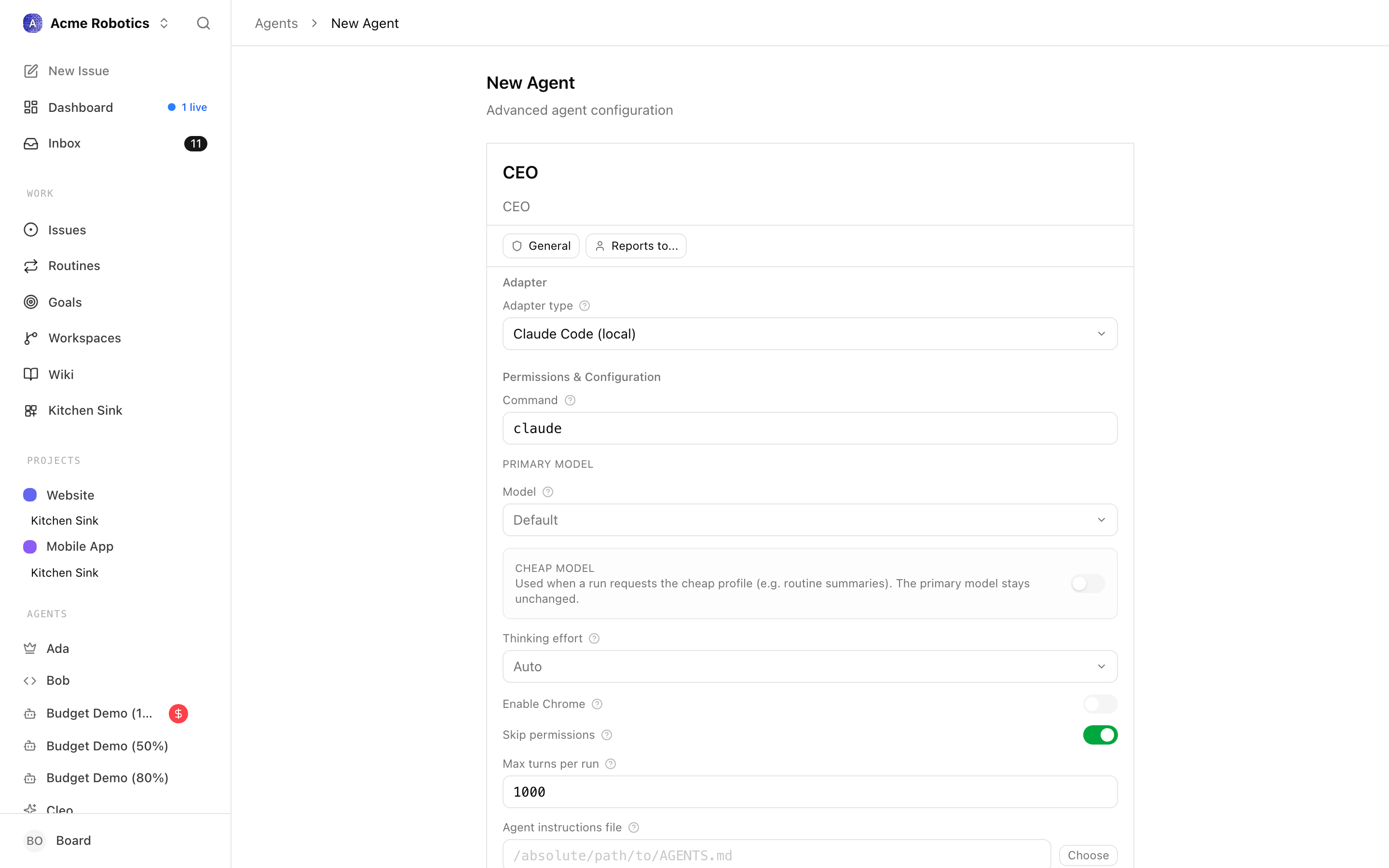
Working directory
The folder on your Mac where the agent does its work — reads files, writes outputs, runs commands. If you're using this agent for a software project, point this to your project folder. If you're not sure, create a new folder called paperclip-workspace on your Desktop and use that.
Tip: Give each agent its own working directory if they're doing different kinds of work. Shared directories can lead to agents accidentally overwriting each other's files.
Model Which Claude model to use. The main choices:
claude-opus-4-6— most capable, best reasoning, highest cost. Good for your CEO or complex strategic agents.claude-sonnet-4-6— fast, capable, lower cost. Good for worker agents doing routine tasks.
When in doubt, start with Sonnet for workers and Opus for the CEO.
Environment variables
The agent form includes an Environment variables section. Add ANTHROPIC_API_KEY there, either as a plain value or as a secret reference. If you're not sure what key name to use, ANTHROPIC_API_KEY is the standard one.
Timeout (seconds) How long a single heartbeat run is allowed to take before Paperclip cuts it off. 300 seconds (5 minutes) is a safe default for most tasks. Complex coding tasks may need longer — you can increase it to 600 or more. Setting it too low will cause agents to time out mid-task.
Common errors
"Claude Code not found" — Claude Code isn't installed, or isn't on the system PATH. Install it from claude.ai/code and then use the Test Environment button to verify Paperclip can find it.
"API key invalid" — Check that the environment variable name matches exactly what you've configured, and that the key itself starts with sk-ant-. Anthropic keys are case-sensitive.
"Timeout" — The heartbeat ran longer than your timeout setting. Increase the timeout value, or break the task into smaller pieces so each heartbeat can finish faster.
Codex Local (codex_local)
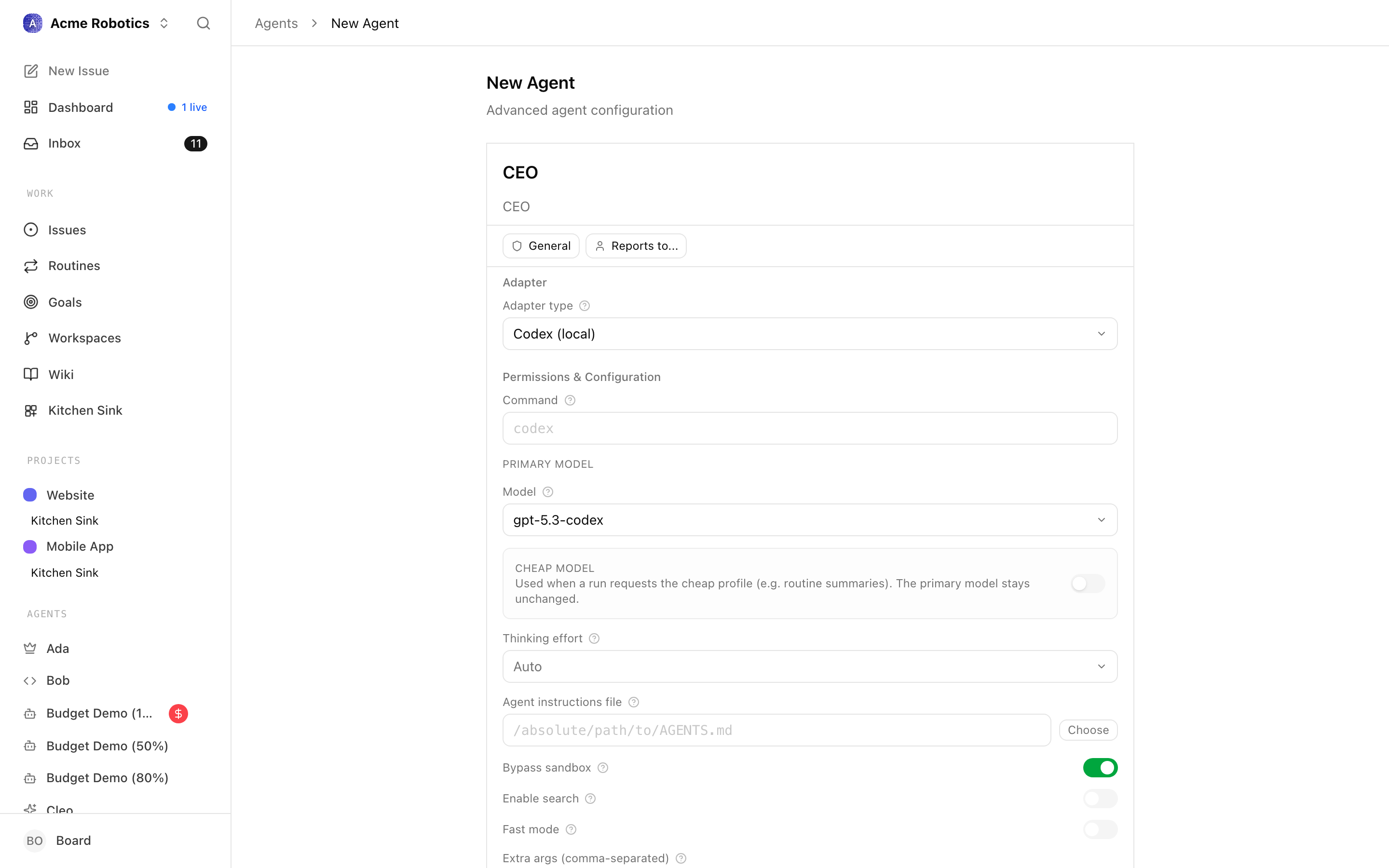
The codex_local adapter runs your agent using OpenAI's Codex CLI on your Mac. It works the same way as claude_local but uses OpenAI models instead of Anthropic.
Prerequisites
- OpenAI Codex CLI installed on your Mac
- An OpenAI API key (platform.openai.com)
Configuration fields
The fields are the same as claude_local — mainly model selection and environment variables — but pointing to OpenAI instead of Anthropic.
Model examples for Codex:
gpt-5.3-codex— the default and the normal starting pointo4-mini— fast and cost-effective for routine tasks
OpenCode Local (opencode_local)
The opencode_local adapter runs your agent using OpenCode — a flexible, open-source AI terminal tool that supports multiple providers. It lets you configure exactly which model and provider to use via the adapterConfig.model field in provider/model format.
When to use this: If you want to switch between providers easily, or use a model not available through claude_local or codex_local directly.
The configuration is similar to the other local adapters, with an additional Model field in provider/model format (e.g., anthropic/claude-opus-4-6 or openai/gpt-5.3-codex).
Other adapters you may see
Three built-in adapter types are marked "Coming soon" in the agent-config dropdown and can't be picked directly from the UI today. They're fully functional in the runtime — you just configure them via the API or an imported company export until the UI picker lands.
openclaw_gateway— remote OpenClaw instances reached over the WebSocket gateway protocol. Today, the normal path is the OpenClaw invite-prompt flow on the Company Settings page. See OpenClaw Gateway.http— webhook-style invocation into your own service. Aimed at developers building custom agent integrations. See HTTP.process— runs an arbitrary local command or script. See Process.
External adapter plugins can also be installed — they appear in the dropdown once loaded.
HTTP Webhook (http)
Info: The
httpadapter is currently not selectable from the agent-config dropdown. Configure it via the API or an imported company export for now.
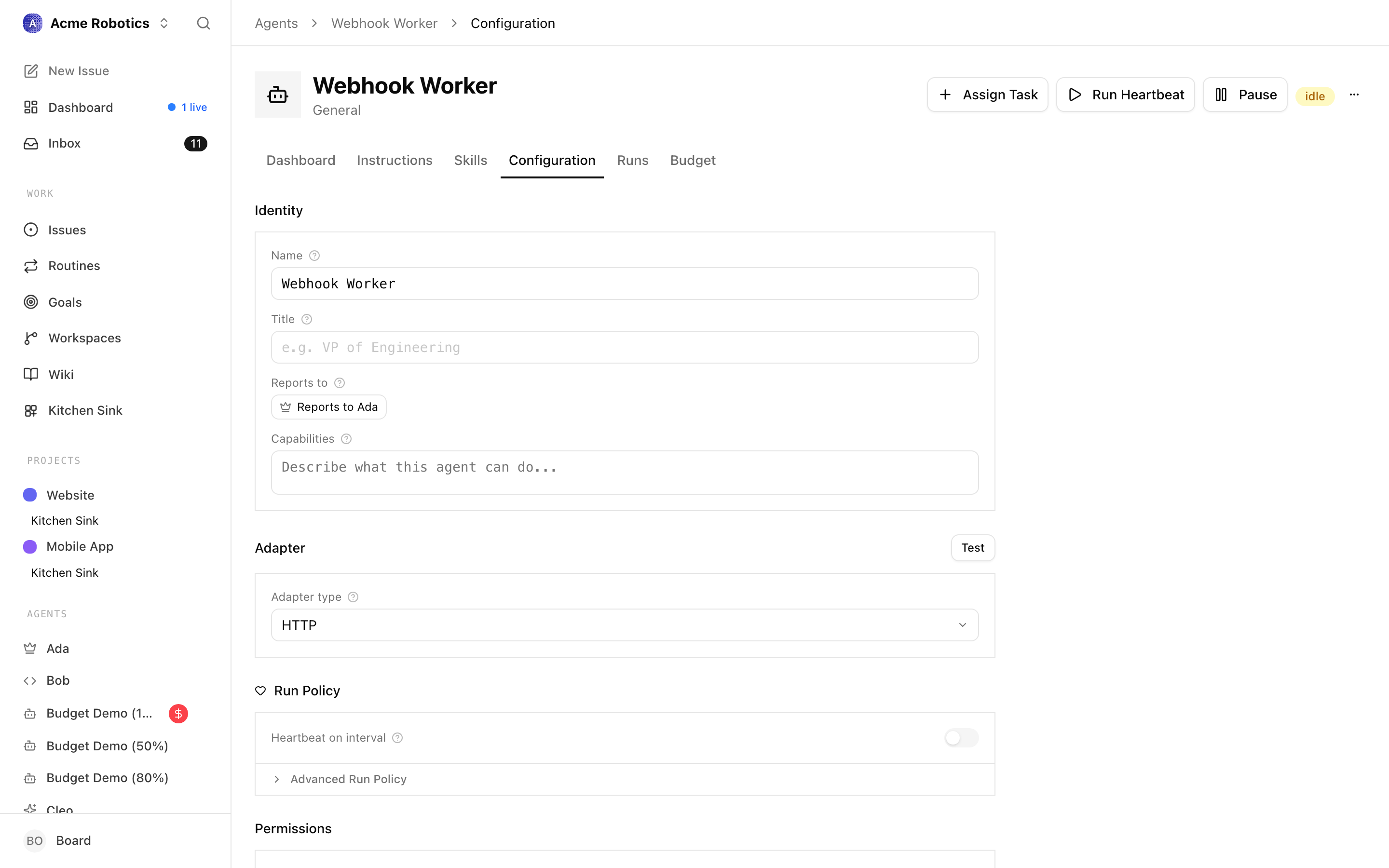
The http adapter connects to a web server or cloud function that you control. When a heartbeat fires, Paperclip sends an HTTP request to your endpoint with the agent's context and tasks. Your endpoint processes the work and sends results back.
When to use this: When your agent lives in the cloud, runs on a different machine, or is built on a platform that accepts webhook calls.
Configuration fields
Endpoint URL The full URL Paperclip will POST to when a heartbeat fires. This must be publicly accessible or reachable from your Paperclip instance.
Authentication A secret token that Paperclip includes in the request header, so your server can verify the call came from Paperclip and not someone else.
Timeout How long Paperclip waits for a response before treating the heartbeat as failed.
Note: The HTTP adapter is aimed at developers building custom agent integrations. If you're using a standard AI provider locally,
claude_localorcodex_localis the simpler choice.
Shell Process (process)
Info: The
processadapter is currently not selectable from the agent-config dropdown. Configure it via the API or an imported company export for now.
The process adapter runs a command on the same machine as Paperclip. When a heartbeat fires, Paperclip executes the command you specify, passing the agent's context as stdin or environment variables.
When to use this: For custom scripts, local automation, or agents built on tools that don't have their own dedicated adapter.
Configuration fields
Command The executable command and any arguments. The command must be accessible from the machine running Paperclip.
Working directory Where to run the command.
Environment variables Additional environment variables to set for the process (e.g., API keys, paths).
Getting API keys
If you haven't set up an API key yet, here's how:
- Go to console.anthropic.com and sign in or create an account
- In the left sidebar, click API Keys
- Click Create Key
- Give it a name you'll recognise (e.g. "Paperclip")
- Copy the key immediately — it starts with
sk-ant-and is only shown once
Store it somewhere safe (a password manager works well). You'll use the environment variable name ANTHROPIC_API_KEY when configuring the adapter.
Warning: Copy the key immediately after creating it. Anthropic shows it only once. If you lose it, you'll need to create a new one and update your adapter configuration.
- Go to platform.openai.com and sign in or create an account
- Click your profile icon in the top right, then click API keys
- Click Create new secret key
- Give it a name (e.g. "Paperclip") and click Create secret key
- Copy the key immediately — it starts with
sk-and is only shown once
Store it somewhere safe. You'll use the environment variable name OPENAI_API_KEY when configuring the adapter.
Warning: Copy the key immediately after creating it. OpenAI shows it only once. If you lose it, you'll need to create a new one and update your adapter configuration.
You're set
You now understand what adapters are and how to configure the most common ones. The next guide covers execution workspaces — the isolated code environments that agents work within when doing file-based tasks.